An electric stacker is waiting beside the charging point at the start of a shift. The display switches on and the truck worked normally yesterday. Can the operator begin moving pallets?
Not yet. A short inspection may reveal a damaged wheel, hydraulic leak or faulty safety control before the stacker enters a busy warehouse aisle. This electric stacker inspection checklist uses the QSLIFT QES10E i QES15E as practical examples. Always follow the operating manual for the specific model, as components and inspection procedures may differ.
Why inspect an electric stacker before every shift?
Electric stackers combine powered travel, load lifting, braking, battery systems and operator-safety controls. A defect in any of these areas can affect the operator, nearby pedestrians, goods, racking and the machine itself. A consistent pre-shift inspection helps a warehouse team:
- – Detect visible damage early
- – Prevent minor faults from causing larger repairs
- – Reduce avoidable downtime
- – Keep unsafe equipment out of service
- – Improve communication between operators and technicians
- – Maintain a clear inspection record Complete the inspection before the truck’s first use of the shift.
Check it again after a collision, after another operator reports a problem or whenever its behaviour changes.
Start with the floor and surrounding area
Walk around the stacker before touching the controls. Check the floor beneath the drive unit and mast for oil, water or another unexplained liquid. Do not search for a hydraulic leak with your hand. Pressurised fluid can penetrate the skin.
Also look for:
- Stretch film, packaging straps or wire near the wheels
- Loose objects around the charging area
- Damage to the charger, cable or plug
- Marks that suggest contact with racking or walls
- Objects blocking the stacker’s route.
If you cannot identify the source of a leak, isolate the truck and ask a qualified technician to inspect it.
Six areas to check on a pedestrian electric stacker
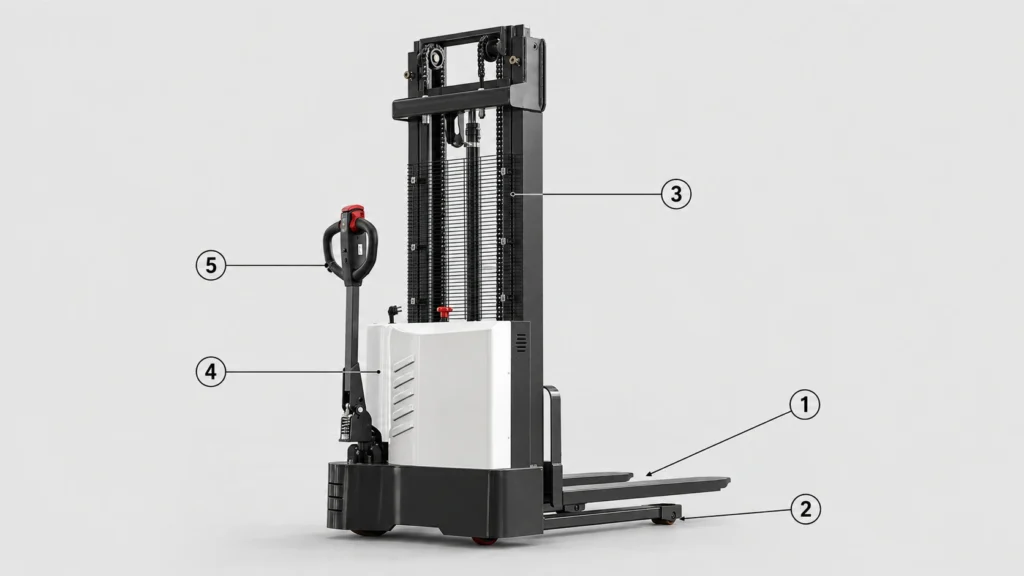
The following illustration shows the principal external areas on a QES-series stacker.
Inspection areas: 1 forks; 2 load wheels; 3 mast, chains and hydraulic lifting area; 4 chassis and covers; 5 tiller controls; 6 battery and emergency-stop area.
1. Forks
Look along both forks from the heel to the tip.
Check for:
- Cracks
- Bending or twisting
- Unequal fork height
- Damaged fork tips
- Severe wear
- Signs of an impact The forks should appear straight, parallel and evenly positioned. Stop using the stacker if one fork looks lower, more heavily worn or differently aligned from the other.
Never try to straighten or weld a damaged fork without an authorised technical assessment.
2. Load wheels
Load wheels work close to the floor and can collect packaging material.
Inspect the visible wheels for:
- Cuts, cracks or missing material
- Flat areas
- Uneven wear
- Plastic film, string or wire
- Damage around the wheel mounting
- Restricted movement
A damaged or obstructed wheel can cause vibration, poor tracking and difficulty crossing floor joints.
Remove only loose debris that you can reach safely. Ask a technician to remove material trapped inside the wheel assembly.
3.Mast, chains and hydraulic system
Inspect the mast from outside the guarded area. Keep your hands, head and tools away from the lifting mechanism.
Look for:
Visible mast distortion
Damaged or heavily corroded chain sections
Chains that appear unusually loose or uneven
Oil around cylinders, hoses or connections
Foreign material inside the mast channels
Damaged guards
Loose or missing visible fasteners
The operator should identify obvious abnormalities, not adjust the chains or dismantle the mast. Qualified technicians must perform chain measurement, adjustment and hydraulic repairs.
4.Chassis and protective covers
Walk around the driving unit and inspect its external condition.
Confirm that:
Covers and panels remain secure
No sharp or broken edges are present
The chassis has no obvious impact damage
Ventilation openings remain clear
Protective guards are correctly fitted
Safety labels remain readable
The capacity plate is present
A cracked cover does not always make a stacker unsafe. However, it may show that the truck suffered an impact. Report the damage so the service team can decide whether to inspect the components underneath.
5.Tiller and operating controls
The tiller is the operator’s main connection with a pedestrian stacker.
Before switching on the machine, look for:
A cracked or damaged handle
Loose switches or buttons
Damaged control housings
Exposed wiring
Missing control symbols
A tiller arm that does not move normally
After the visual inspection, test the controls in a clear area. Travel, steering, lifting and lowering should respond smoothly and predictably.
Also test the horn, braking and the tiller-head reversing safety function where fitted. Stop if a control sticks, reacts slowly or causes unexpected movement.
6.Battery, charging connection and emergency stop
First, confirm that the charger is disconnected. Then inspect the visible battery and charging components.
Check that:
The battery has sufficient charge for the planned work
The plug and cables show no visible damage
No conductors are exposed
Connectors sit in their correct positions
There are no signs of burning or overheating
The battery remains correctly retained
The display shows no unresolved battery fault
The red emergency-stop button must remain accessible and undamaged. Test it according to the machine instructions and confirm that it resets correctly.
Do not use a damaged charging plug or cable. Never modify a connector or bypass a battery-protection system.
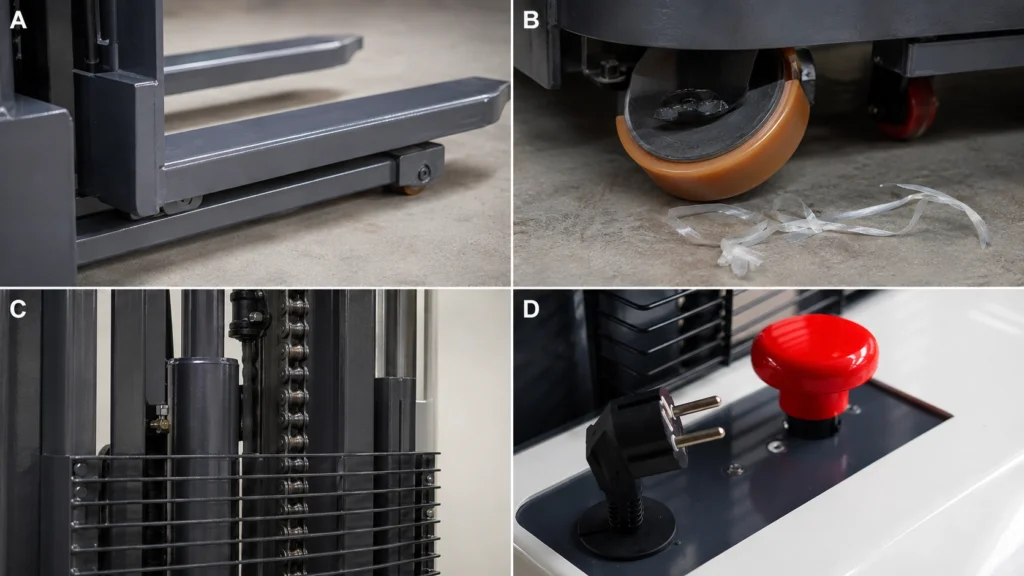
Close-up inspection points
Close-up examples: A, forks and fork heels; B, load wheel and nearby packaging debris; C, externally visible mast chain and hydraulic area; D, emergency-stop button and charging plug.These images show the boundary between an operator inspection and technical maintenance. The operator can look for visible defects and test normal functions. However, the operator should not remove covers, adjust chains, open electrical systems or attempt unauthorised repairs.